How to Play Fortnite on Xbox Cloud Gaming for Free
10 ноября 2026 г. · 2 мин чтения
На этой странице
You can play Fortnite through Xbox Cloud Gaming in a browser without a paid Game Pass subscription. Epic directs players to xbox.com/play, using a free Microsoft account, a compatible device and a suitable internet connection.
Checked November 10, 2026 against Epic’s Xbox Cloud Gaming guide.
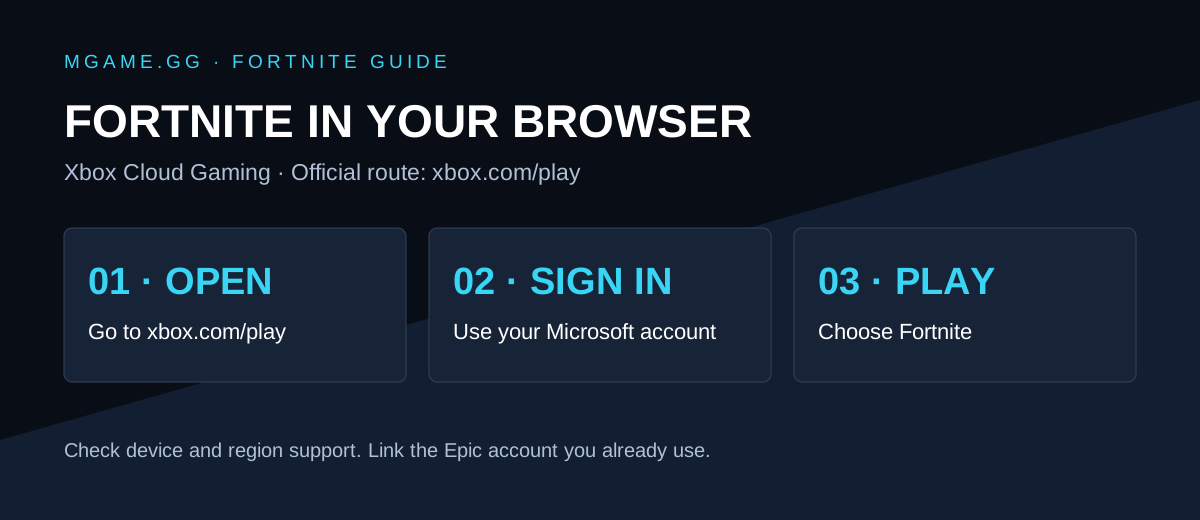
Setup diagram by mgame.gg; this is not a screenshot of the service.
How to start
- Open xbox.com/play in a supported browser on your device.
- Sign in with your Microsoft/Xbox account and select Fortnite.
- Follow the service’s prompts to launch your session.
- Use supported touch controls or a compatible controller.
You are streaming a remote session, so you do not install Fortnite’s full game files on that device. Region, device support, queues and service availability still matter.
Will my skins and progress transfer?
Epic says your Microsoft/Xbox account must be connected to the same Epic account you already use for Fortnite. Check that link before starting a fresh account or buying anything. Our cross-platform guide covers playing with friends.
If it will not launch
| Symptom | Useful check |
|---|---|
| You cannot find Fortnite | Open the browser service directly and check regional availability |
| Your locker looks empty | Confirm which Epic account is linked to the Xbox account |
| Input feels delayed | Compare another network connection and pause competing downloads |
| A queue appears | Read the service’s current queue message; no third-party shortcut can guarantee a place |
These are troubleshooting suggestions, not a promise of a particular latency or queue time.
What about GeForce NOW and Luna?
Epic also lists those services on its cloud-streaming support page. Their account requirements and plans differ; Xbox’s free Fortnite access does not establish the terms of another provider.
Once connected, adjust your Fortnite settings to suit your controls.